SECND
Browse help

Offers

Depop Offers

Configure automatic offers for Depop.

Last updated 2026-08-23

In short

Connect Depop, open More → Offers, then enable and save its offer rules.

Set up offers

1.

Open Depop

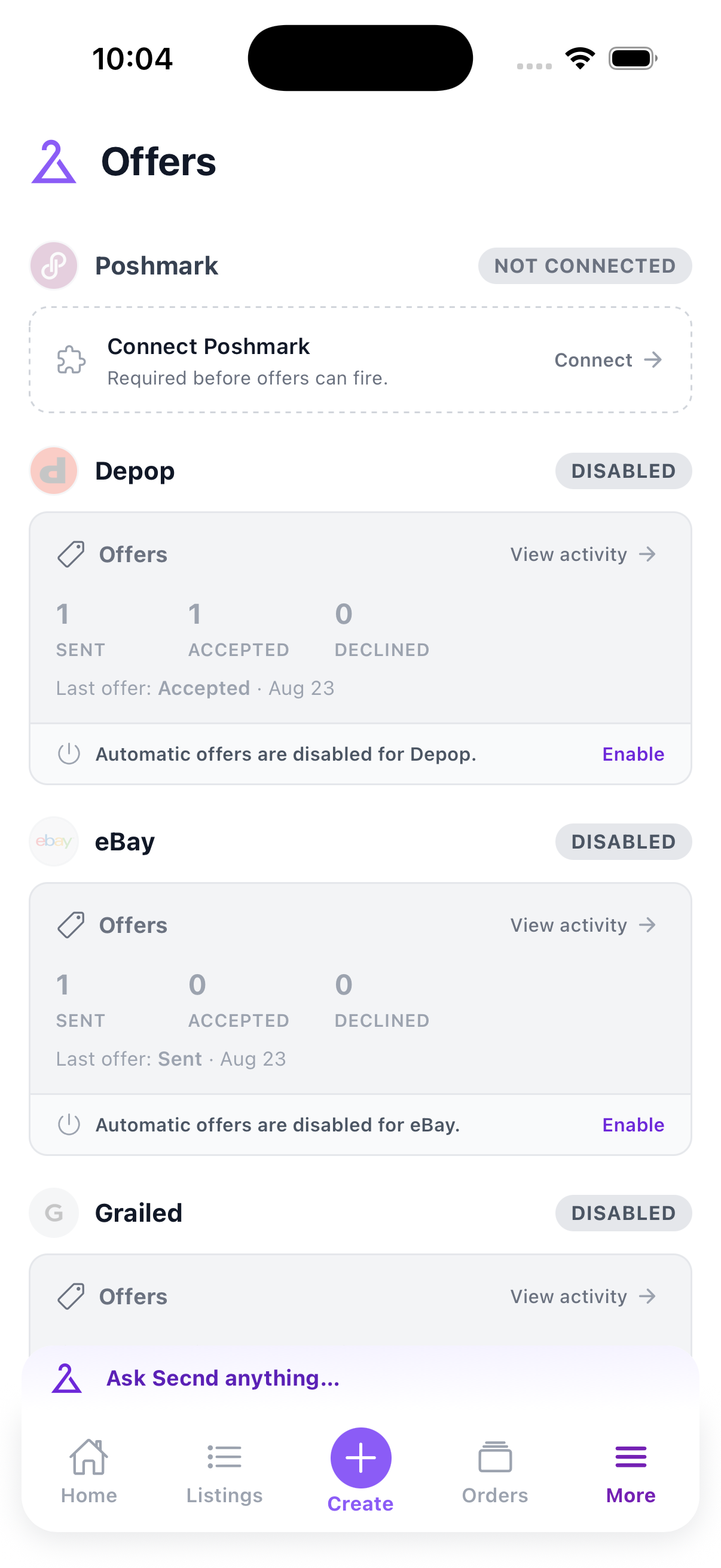
Find the Depop card under More → Offers. Connect the marketplace first if the card says Not connected, then tap Enable or Change.
Offer marketplace cards with connection status and recent activity
2.

Enable auto-offers

Turn on Auto-offers. SECND sends offers when buyers engage with eligible listings.

Offer rules

3.

Set the default offer

Choose a discount of at least 5%, calculate it from the current sale price or original price, and choose how long SECND waits after engagement.
4.

Add optional rules

You can increase an ignored offer after 48 hours, skip new arrivals, and add tier rules. SECND evaluates tiers from top to bottom and uses the first match.
5.

Save the rules

Tap Save offer rules. The marketplace card shows whether automatic offers are active.

Review activity

6.

Open offer history

Tap View activity on the Depop card to review sent, accepted, declined, and skipped offers.

Have a question that isn't answered here? .